How to get clear website feedback from clients: a complete guide for agencies
Vague notes, scattered emails and endless rounds are a process problem, not a client problem. Here is the process that gets you clear, usable website feedback.
Final Fold
15 min read

Every agency knows the email. It arrives the morning after you send the staging link, and it says something like: "Looks great! Just a few things. Can the button pop more? The photo feels off. And my business partner thinks the homepage is too busy."
Nothing in it is wrong, exactly. The client is being honest. But you can't act on any of it. Which button? Pop how? Off in what way? Which part of the homepage is busy, and does the business partner get a vote?
So you reply with questions. They reply with a screenshot of the wrong page. Someone else on their side replies-all with a different opinion. A week later you're on round four of a project you quoted for two, and nobody can say for sure what was approved.
This guide is about getting out of that loop. Not with a better email template, but with a feedback process that makes clear feedback the easy option for your client and the default for your team.
The short answer
To get clear website feedback from clients, give them one process instead of an inbox: name one person who approves, define a round of changes as one batch of feedback, have clients leave every note on the live website on the element it's about, sort each note before fixing it, keep the round count visible to both sides, and end with a signed approval.
- One approver. Everyone can comment; one named person decides.
- Rounds you can count. One round is one batch of feedback, counted per page, visible to the client.
- Feedback on the page, not in email. Each note is pinned to the element, with the page, screen size and browser attached.
- Sort before you fix. Category, priority, owner and status for every note.
- Price extras, never your own misses. New requests are quoted; items you didn't fix properly never use a round.
- A real sign-off. Pages approved by name and date, then one signed project approval.
The rest of this guide shows how to set each one up, with wording you can reuse and a checklist at the end.
Why does website feedback go wrong?
Website feedback goes wrong because of four gaps in the process, not because of difficult clients. Name them, and each one has a fix.
1. The feedback is separated from the thing it's about. A note in an email has lost its context. It doesn't know which page it refers to, which part of the page, what screen size the client was on, or which browser they used. Your developer has to reconstruct all of that, and they'll guess wrong some of the time.
2. Nobody knows when feedback is "done". If notes can arrive at any time, from anyone, through any channel, there is never a moment when the client has finished reviewing. Your team starts fixing, new notes keep arriving, and every fix risks being undone by the next message.
3. The scope is invisible to the client. You know you quoted two rounds of changes. The client doesn't think in rounds. To them, every note is just a small thing. Without a visible count, they can't see the line they're crossing, and you're left choosing between eating the cost and having an awkward conversation.
4. Approval is assumed, not given. "Looks good" in a reply isn't a sign-off. It's not clear who said it, what exactly they approved, or whether it still stands after the next change. When something comes back after launch, there's no record to point to.
Each section below closes one of these gaps.
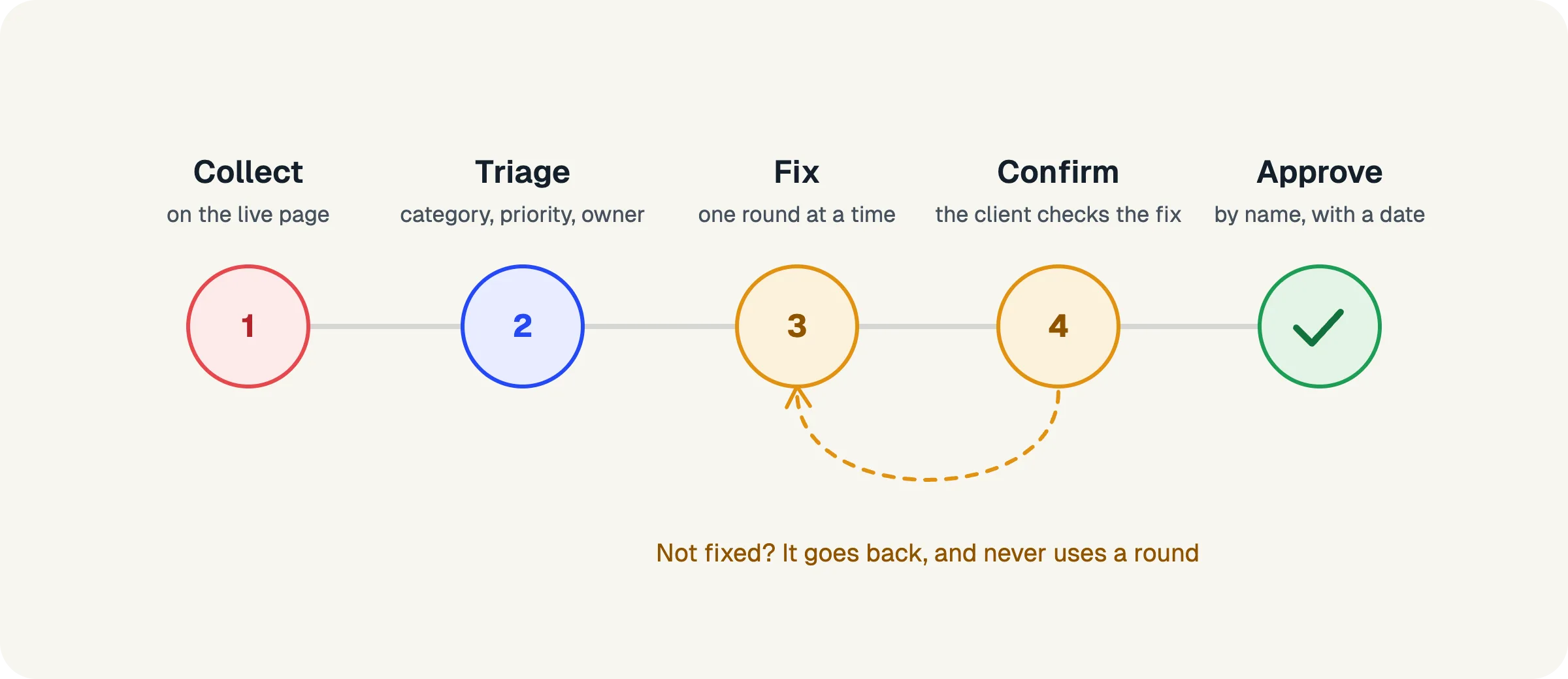
How should you prepare clients before a website review?
Prepare clients by agreeing four things at kickoff: who approves, how many rounds are included, what they review on, and how to leave feedback. Most feedback problems are decided before the client opens the first link.
Agree on one person who approves
Ask the client to name one approval owner: the person whose yes means yes. Others on their side can still review and comment, but one person decides. This single step removes most of the conflicting-opinions problem, because there's always someone whose job is to settle it.
Write it into the proposal or kickoff notes in plain words: "Sarah will review and approve each page. Others are welcome to leave comments, and Sarah will confirm what goes ahead."
Say how many rounds of changes are included, and what a round is
"Two rounds of revisions" means nothing until you define a round. The definition that works best in practice is simple: one round is one batch of feedback sent together. Not one comment, not one day, but one submission that says "here is everything we want changed on this page for now".
This framing helps the client as much as you. It encourages them to gather their thoughts and send them together, instead of drip-feeding notes as they think of them. It also makes rounds easy to count.
Be clear about two related cases at the start:
- Fixes that weren't done right don't count as a round. If you said a change was made and it wasn't, sending it back is your problem, not their allowance. Saying this up front builds trust.
- New requests beyond the allowance are extra work. Not forbidden, just priced. You'll quote them before you do them.
Decide what the client reviews on
Reviewing static mockups and reviewing a built website are different jobs. A mockup review is about direction: layout, hierarchy, tone. A website review is about the real thing: how it behaves on a phone, how forms work, whether the copy fits.
For the build stage, have clients review the live website or the staging site itself, not screenshots of it. Screenshots hide exactly the problems you want found: responsive layouts, hover states, broken links, slow images.
Brief the client in five minutes
Clients give better feedback when they know what you need. Send a short brief with the review link. It doesn't need to be long:
- What to review now, and what to ignore. If the blog template isn't styled yet, say so, or you'll get ten notes about it.
- How to leave feedback: on the element it's about, one point per note, with the reason if they have one.
- What kind of feedback helps: "this headline doesn't sound like us" is useful; "make it pop" is a starting point for a conversation.
- When to send it: all notes for a page together, by a date.
- Who approves.
A useful line to include: "Tell us what you see and why it matters to you. Let us worry about how to fix it." It steers clients away from prescribing solutions ("make it red") and toward describing problems ("I can't find the button on my phone"), which are much easier to solve well.
Ten minutes of setup at kickoff is cheaper than a week of back-and-forth later.
Where should clients leave website feedback?
Clients should leave website feedback on the live website itself, pinned to the element it's about, not in email or a shared document. It's the single biggest improvement most agencies can make.
Put every note on the element it's about
When a client can click the exact button, heading or image they mean and leave their note right there, three things happen. Ambiguity drops, because the note points at the thing. Your team stops guessing which page and which part. And the client writes shorter, clearer notes, because the location says half of it for them.
Good feedback tools also capture the context automatically: the page address, the screen size, the browser and the element itself. That turns "the button looks broken" into a reproducible bug report without the client having to know what a viewport is.
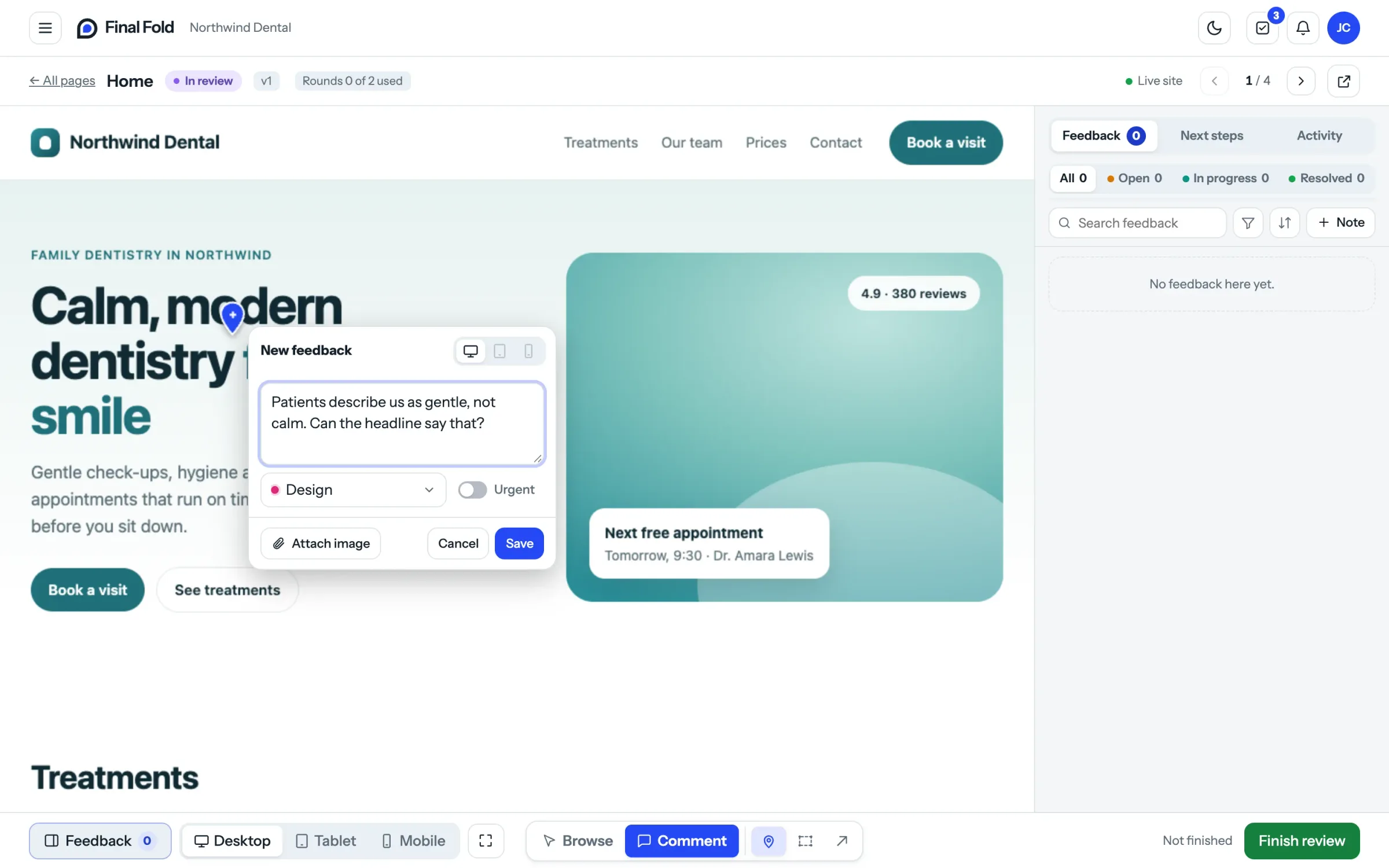
In Final Fold, clients review the real, live website from a link, with nothing installed on their site. They pin notes to elements, highlight areas, draw arrows, or leave a general note for the whole page, and attach a screenshot or image when words aren't enough. Every note is recorded with the page, screen size, browser and element.
One point per note
Ask for one point per note. A single note that says "fix the menu, change the hero photo, and the footer email is wrong" will be two-thirds done at best. Three notes can be assigned, fixed and confirmed separately. Make this easy by making notes quick to leave; clients only bundle points together when leaving each one is a chore.
Keep your team's notes separate from the client's
Your team will find problems during the review too, and they need somewhere to write them. Keep internal notes visibly separate from client feedback, so the client never sees "dev: this breaks on Safari, fix before Friday" in their review. Mixing the two either clutters the client's view or drives your team's notes back into chat, where they get lost.
Let other reviewers in without losing control
The client's marketing lead, the founder, the person who writes the copy: they all have views, and it's better to hear them during the review than after launch. Let them review from a personal link, without an account, so they can take part. But keep the approval with the approval owner. Everyone can comment; one person decides.
Feedback that lives in an inbox gets lost. Feedback that lives on the page gets fixed.
What should you do when client feedback arrives?
Sort it before you fix it: give every note a category, a priority, an owner and a status. Don't start at the top of the list. Ten minutes of sorting is the cheapest time you'll spend on the project.
Sort every note
For each note, decide four things:
- Category: is it a bug, a design change, a content change, or a question? Content notes often go back to the client; bugs never should.
- Priority: does it block launch, or is it a nice-to-have?
- Owner: who on your team will do it?
- Status: open, in progress, or done.
Agencies that skip this step end up fixing the easy things first and the important things last, and discover on launch day that a blocking bug was note fourteen.
Talk it through on the note, not in email
Some notes need a conversation: "Do you mean the photo itself, or how it's cropped?" Have that conversation in a comment on the note. It keeps the question next to the thing it's about, it's visible to everyone working on it, and it becomes part of the record. A question in email is a question that gets lost.
Watch for new scope
Some feedback isn't a change to what you agreed. It's a new idea. "Can we add a booking form?" on a site that was never meant to have one is new scope, however casually it's phrased. Flag it when you see it, and handle it as an extra request (see below) rather than quietly absorbing it into the round.
Every request you absorb in silence teaches the client that the next one is free too.
How should you count rounds of changes?
Count one round as one batch of feedback the client sends together, count it per page, and show the count to the client before they send. Rounds only protect your margin if both sides can see them.
Make the count visible to the client
When the client sends a batch of feedback, they should see which round it is and how many are left: "This uses round 1 of 2 for this page." No surprise at round three, no awkward email. The count does the talking.
Counting per page works better than per project for most website work. Clients rarely change the whole site at once, and a page-by-page allowance lets you approve the finished pages while others are still in progress.
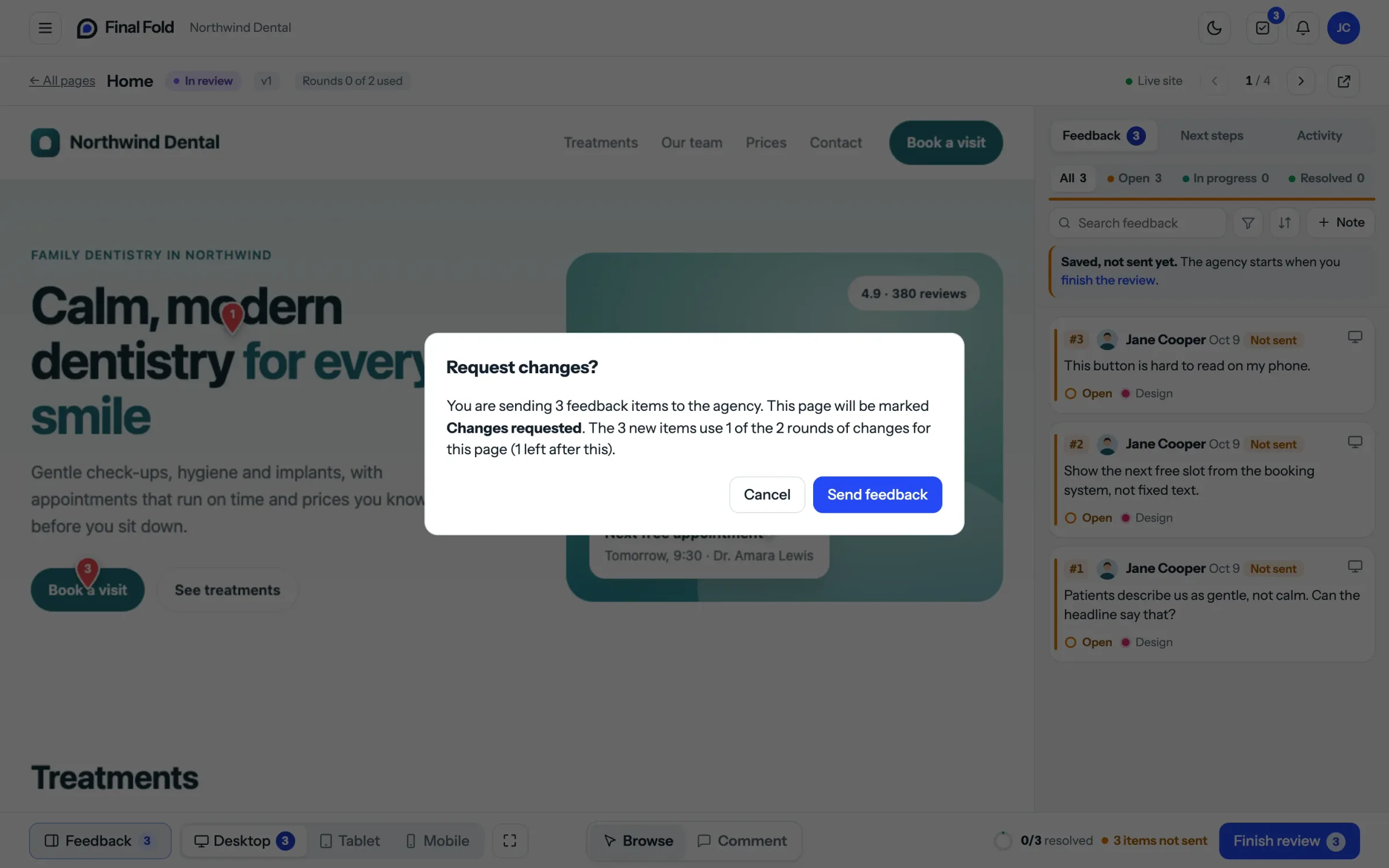
In Final Fold, one "Request changes" is one round, however many notes it carries. The agency sets how many rounds each page includes, and the client sees the count before they send.
Don't charge for your own mistakes
If an item comes back because it wasn't fixed properly, sending it back must never use up a round. Say this up front and stick to it. It's fair, and it's also what keeps clients willing to work inside the round system: they know they're not being penalised for your misses.
Price extra requests before you do them
When the client has used their rounds and wants more changes, or asks for something that was never in scope, it isn't a problem. It's a sale. Treat each new request beyond the allowance as an extra request you can accept, decline, or quote for. The worst outcome is doing it silently and resenting it; the second worst is refusing without offering a price.
A neutral way to say it: "Happy to do this. It's outside the two rounds included for this page, so it'll be a small extra. I'll send a quote."
Let the client confirm each fix
Before a page goes to approval, the client should check that each fix is actually what they asked for. A simple "looks fixed" per item closes the loop item by item, and catches misunderstandings while they're small. If a client confirms something by mistake, there should be a way to say so, rather than discovering it after launch.
A count both sides can see does the awkward talking for you.
How do you get a website approval that holds up?
A website approval holds up when it says who approved, exactly what they approved and when, and when it can't be quietly rewritten later. That means a real approval, not a reply that says "looks good".
Approve page by page
Ask the approval owner to approve each page when it's ready, with their name and the date. Page-by-page approval keeps momentum (finished pages stop moving), shows both sides how close the project is to done, and makes the final sign-off a formality rather than a cliff edge.
Finish with a signed project approval
When every page is approved, ask for one final project approval, signed by the approval owner with their name. This is your signal to launch, hand over and send the final invoice.
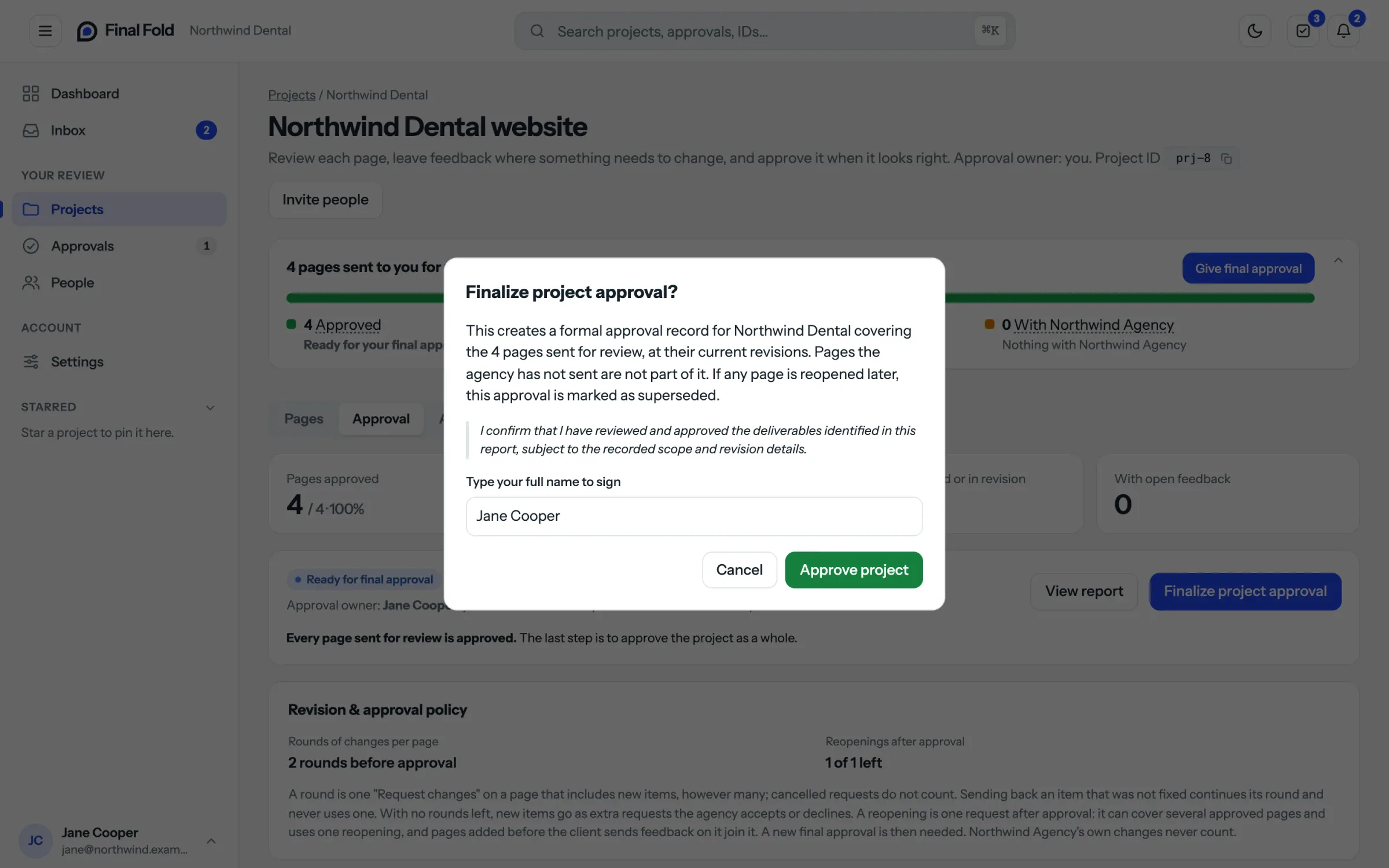
In Final Fold, the approval owner approves each page with their name and date, then signs the final project approval with their typed name, and an official approval PDF is issued that stays fixed once it's issued.
Keep the record, and handle changes after approval honestly
Clients will sometimes want to reopen an approved page: a new photo, a changed price, a legal update. That's normal. What matters is that reopening is a deliberate step with a reason, not a quiet edit, and that the original approval stays on record as what was approved at the time. Decide in advance how many reopenings are included, and treat the rest as new work.
"Looks good" starts a conversation. A signature ends one.
A checklist you can use on your next project
At kickoff
- The approval owner is named.
- Rounds of changes per page are agreed, and "one round" is defined as one batch of feedback.
- It's agreed that items not fixed properly don't use a round.
- It's agreed how extra requests and new scope are priced.
- The number of reopenings after approval is agreed.
When you send the review link
- The client reviews the live or staging website, not screenshots.
- The brief says what to review, what to ignore, and by when.
- The client knows to leave one point per note, on the element it's about.
- Other reviewers can take part, and everyone knows who approves.
When feedback arrives
- Every note has a category, priority, owner and status.
- Questions are answered on the note, not in email.
- New scope is flagged and quoted, not absorbed.
Before approval
- The client has confirmed each fix.
- Each page is approved by name and date.
- The project ends with a signed approval, and the record is kept.
FAQ
What is a round of revisions in web design?
A round of revisions is one batch of feedback the client sends together, which the agency then works through. However many notes it holds, it counts as one round. Defining it this way, rather than per comment or per day, makes rounds easy to count and encourages clients to send complete feedback.
What is the best way to collect website feedback from clients?
The best way is to have clients leave feedback directly on the live or staging website, pinned to the element each note is about, with the page, screen size and browser recorded automatically. It removes guesswork, keeps every note in one place, and makes each note easy to assign and track.
How many rounds of revisions should a website project include?
Two rounds per page is a common, workable default for most small business sites: one for the first reactions, one for the refinements. Larger or more design-led projects often need three. What matters more than the number is defining a round (one batch of feedback sent together) and making the count visible to the client.
What if the client keeps sending feedback by email anyway?
Don't fight it; redirect it. Thank them, add their notes to the review yourself if they're small, and point them to the review link for the next batch: "I've added these to the page so the team can track them. Next time, leaving them right on the page will save you a step." Most clients switch once they see notes land on the element.
What if two people on the client's side disagree?
That's what the approval owner is for. Take both views back to them on the note itself and ask them to decide. It's their call, not yours, and having it recorded saves an argument later.
Should clients review on desktop or mobile?
Both, and you should ask for both explicitly. Many of your client’s visitors will arrive on a phone, while most clients review on a laptop. Ask the approval owner to check key pages on their own phone before approving, and make sure your feedback tool records the screen size so mobile issues are obvious.
Is "looks good" in an email enough to call a project approved?
It's better than nothing, but it's weak. It doesn't say who approved, which pages, or which version. A named, dated approval per page and a signed approval for the project give you something you can point to when questions come up after launch.
Where to start
Clear website feedback isn't about finding better clients. It's about giving every client a process where the clear option is the easy one. Start with the two changes that pay off fastest: name one approver on your next project, and ask for feedback on the page instead of by email.
You can run this process with a shared document and a lot of discipline. Or you can use a tool built for it. Final Fold puts your clients' notes on the live website, counts the rounds page by page, and ends every project with a signed approval.
15 min left0%