How many revision rounds should you include in a web design quote?
Unlimited revisions sound generous and quietly cost you the most. Here is how to choose the number of rounds, define what one round is, and put it in your quote.
Final Fold
14 min read

The quote went out with the line every designer has written at least once: "Includes unlimited revisions." It felt generous. It felt like good service. The client signed the same day.
Six weeks later the homepage is on its ninth version. The client isn't being difficult; they're just still deciding. Every week brings a new idea, a colleague's opinion, a competitor's site they saw on Sunday. Nobody is counting, because the quote said nobody had to. And the project that should have closed in a month is now eating the time you had planned for the next one.
Revision rounds fix this. Not by being stingy, but by giving both sides a shared rhythm: here is how feedback is gathered, here is how many times we go around, and here is what happens if we need more. This guide covers how many rounds to include, what a round actually is, how to write it into your proposal, and how to handle the moment the rounds run out.
The short answer
Most website projects work well with two rounds of changes per page at the design stage and one round at the build stage, with extra rounds offered at a clear price. What matters more than the number is that a round is defined.
- A round is one batch of feedback, sent together. Not one comment, not one day, not one email.
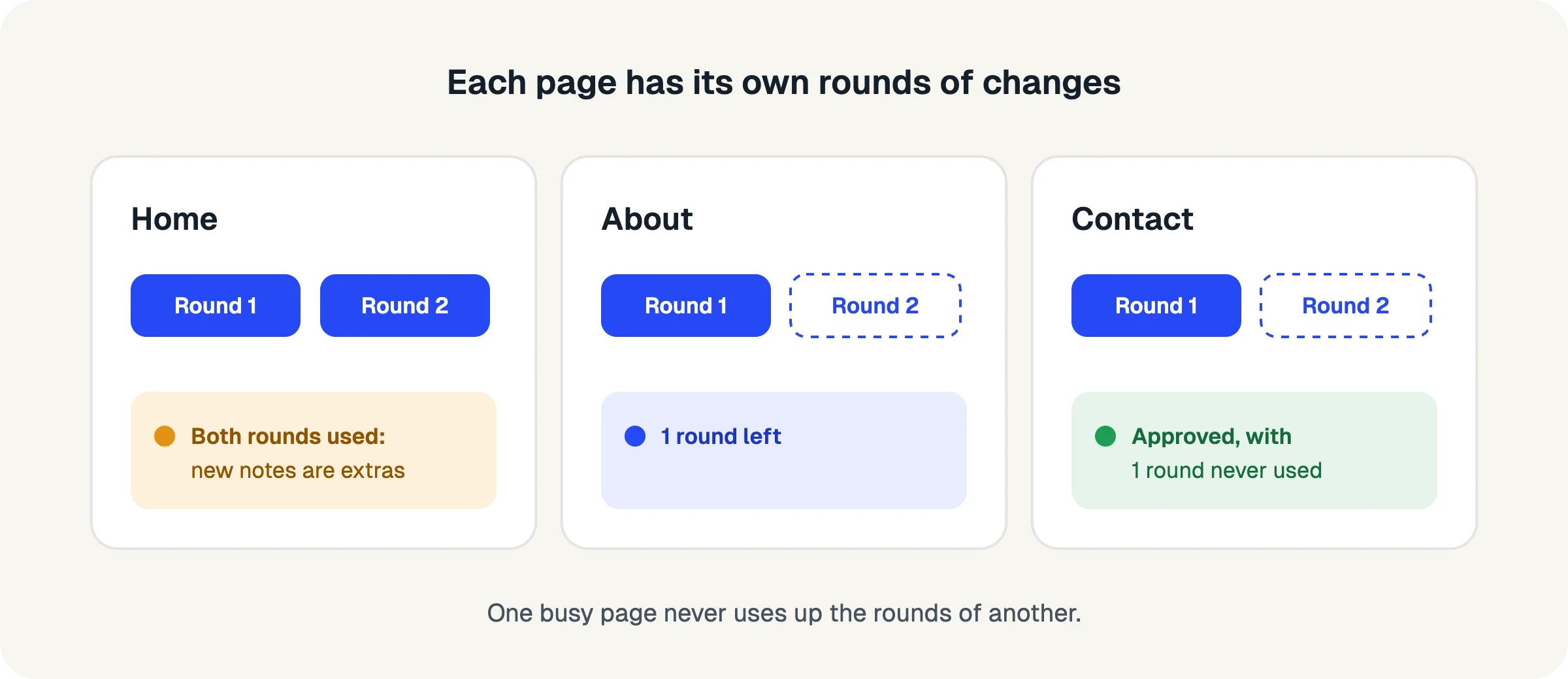
- Count rounds per page, not per project. A busy homepage shouldn't use up the allowance for the contact page.
- Fixes that weren't done right never count as a round. Say so in the quote; it builds trust.
- New work is not a revision. A new page or feature is new scope, priced separately.
- Agree what happens when rounds run out before the project starts, not in the middle of it.
- Make the count visible to both sides while the project runs, so nobody is surprised.
Why do "unlimited revisions" cost agencies the most?
Unlimited revisions cost the most because they remove the one thing that makes feedback converge: a reason to decide.
When there's no limit, there's no cost to "let's see one more version". Feedback arrives in small, scattered pieces, because there's no reason to gather it. Decisions get postponed, because they can always be changed later. And new ideas slip in disguised as revisions, because nobody has drawn the line between changing what was agreed and adding something new.
The cost lands on you, quietly. The project runs longer than quoted. Your effective day rate drops with every round. The next project starts late. And the relationship often suffers too, because an endless project is tiring for the client as well. They didn't hire you to make decisions forever; they hired you to get a website live.
Clients rarely want unlimited revisions. What they want is reassurance that they won't be stuck with something they don't like. A clear number of rounds, plus a fair way to get more, gives them exactly that reassurance, without the open-ended cost.
Unlimited sounds like a promise of quality. In practice, it's a promise of delay.
What counts as one revision round?
One revision round is a single, complete batch of feedback on a piece of work, sent together, followed by your changes. The round ends when you send the updated version back.
The definition matters more than the number, because most disputes about revisions are really disputes about what a revision is. Here are the common ways to count, and why most of them fail:
- Counting comments. "Ten changes included" sounds precise but invites arguments. Is "make the headline bigger and bolder" one change or two? Clients start bundling requests into long sentences to save their allowance, and the feedback gets harder to read.
- Counting days or hours. "Two days of revisions" turns feedback into a timesheet. The client can't see how much time is left, and you end up tracking minutes instead of designing.
- Counting emails. Feedback arrives in trickles: an email on Monday, a message on Tuesday, a forwarded note from the boss on Thursday. Is that three rounds or one?
- Counting batches. One round is everything the client wants changed, gathered and sent at once. This is the definition that works, because it rewards the behaviour you want: complete, considered feedback.
A batch can contain one note or thirty. It doesn't matter. What matters is that the client looks at the whole page, gathers everything (including their colleagues' views), and sends it as one request. You make the changes and send the page back. That's one round.
Count the batches, not the comments.
How many revision rounds should you include?
Include enough rounds for a reasonable client to get to a version they're happy with, and few enough that each round is taken seriously. For most website projects, that means two rounds of changes per page in design and one in development.
The right number depends on the kind of project and the stage you're in.
By type of project
- Template or theme-based sites. The structure is mostly decided before you start. One or two rounds per page is usually plenty, because the client is choosing content and colours, not layouts.
- Custom designed sites. Two rounds per page at the design stage is the most common choice. The first round catches the big reactions ("this isn't the feeling we wanted"); the second refines the details.
- Redesigns of an existing site. Clients often have strong opinions formed by the old site. Two rounds work well, but a clear brief at the start matters even more here, because many changes are really disagreements about the brief.
- Small changes on a live site. One round, often included in a care plan. Anything bigger becomes a small project of its own.
By stage of the project
Rounds work best when they're attached to a stage, because each stage has a different kind of feedback:
- Wireframes or structure: one round. The goal is agreeing on what goes where, not how it looks.
- Visual design: two rounds per page. This is where taste lives, and where most of the feedback will be.
- Built pages on the live staging site: one round per page, for things that only show up in the browser: spacing on a phone, how a form behaves, a link that goes to the wrong place.
Once a stage is approved, its rounds are spent. Going back to change an approved wireframe during the build is a reopening, and it has its own rules (more on that below).
Per page or per project?
Count rounds per page. A project-wide allowance sounds simpler, but it punishes the wrong pages. The homepage almost always gets the most feedback; if it uses up the whole project's rounds, the client has none left for the pages they haven't looked at yet. Per-page rounds keep each page fair, and they make it easy to see where a project is stuck.
Two rounds per page in design, one in build, is a sensible starting point. Adjust from there.
How do you write revision rounds into your proposal?
Write the number, the definition and what happens next in plain words, in the same place as the price. Clients read the price section carefully; it's the best place to set expectations.
Here is wording you can adapt:
Rounds of changes. Each page includes two rounds of changes at the design stage and one round on the built page. A round is one set of feedback on a page, sent together; we make the changes and send the page back. Fixing something we didn't get right never uses a round. >Extra requests. If a page needs more changes after its rounds are used, we'll tell you before starting and quote the extra work, usually as a small fixed price. You can approve it, or decide the page is ready. >New scope. New pages, features or content that weren't in this proposal are new scope. We're happy to add them; we'll price them separately so the agreed project stays on track. >After approval. Once you approve a page, changes to it count as a reopening. This proposal includes one reopening for the whole project.
Three details make this wording work. It defines a round in one sentence. It promises that your own mistakes don't count, which removes the client's biggest fear. And it describes what happens next in a friendly, factual way, so the extra-request conversation later feels like following the plan rather than a negotiation.
Put the definition next to the price, where clients actually read.
Do fixes that weren't done right count as a round?
No. If the client asked for something and you didn't deliver it, sending it back again is part of the same round. Say this in your quote, in so many words.
This one line does a lot of work. Without it, clients worry that every misunderstanding will eat their allowance, so they over-explain, repeat old feedback "just in case", and hesitate to send things back. With it, they can relax: a round is spent on new decisions, not on you catching up.
It also keeps you honest internally. When "not fixed" items are tracked separately from new feedback, you can see which notes were unclear, which fixes keep bouncing back, and where the team needs to read the request more carefully.
In practice, separate the two kinds of notes in the next batch:
- Not fixed: "The button is still grey on mobile." This continues the previous round.
- New feedback: "Now that I see it, can the button say 'Book a visit' instead?" This is part of the next round.
Your mistakes are never the client's cost.
What do you do when the revision rounds run out?
When a page's rounds are used and the client wants more, tell them before you start the work, offer the extra at a clear price, and let them choose. It should feel like the plan working, not like a penalty.
The worst version of this conversation happens after the work is done, on an invoice. The best version happens before, in one short message. Here are a few you can adapt.
When the change is small:
"Happy to make that change. This page has used its two rounds, so this would be an extra request at [price]. Shall I go ahead, or are you happy with the page as it is?"
When the client is still undecided:
"We've been around this page twice now, and I want to make sure the next round gets us there. Would a quick call help to settle the direction before I make more changes? Any further round would be [price]."
When the request is really new scope:
"Adding a team page is a great idea. It wasn't in the original plan, so I'll send you a short quote for it. We can keep the current pages moving in the meantime."
Notice what these messages don't do: they don't apologise for the limit, and they don't refuse. They name the situation, give a price, and hand the decision back to the client. Most clients appreciate this. Many will decide the page is fine as it is, which is often the right decision anyway.
Should you price extras hourly or as a fixed amount?
A small fixed price per extra request is usually easier for everyone. The client knows the cost before saying yes, and you avoid tracking time on a ten-minute change. Keep a simple table in mind: a small change on one page, a larger change on one page, a change across the whole site. Hourly pricing still makes sense for open-ended requests where the size really isn't known.
Ask before the work, price it plainly, and let the client decide.
What about changes after a page is approved?
Changes after approval are reopenings, not revisions. Treat them separately, include a small number in the project, and ask for a reason each time.
Approval is a decision: the client has said this page is ready. When they want to change it later, something has changed. Maybe new content arrived, maybe a colleague saw it for the first time, maybe they simply changed their mind. All of these are fine, but they're different from the normal back-and-forth of a round, because they undo a decision.
A good reopening policy has three parts:
- A small allowance for the whole project. One reopening is common. It covers the genuine "we just realised" moments without inviting a second design process.
- One reopening can cover several pages. If the client wants to change the footer, which appears on every page, that's one reopening, not twelve.
- A reason, every time. "Our legal team needs different wording" tells you how to respond. A reason also helps the client think twice about whether the change is worth reopening an approved page.
When a page is reopened, its earlier approval is kept in the history and marked as superseded. The page goes back into review, and a fresh approval is needed when it's done.
Approval is a decision. Changing a decision deserves its own rule.
How do you make rounds visible while the project runs?
Show the client how many rounds each page has left at the moment they send feedback, not only in the proposal. A limit people can see is a limit people respect.
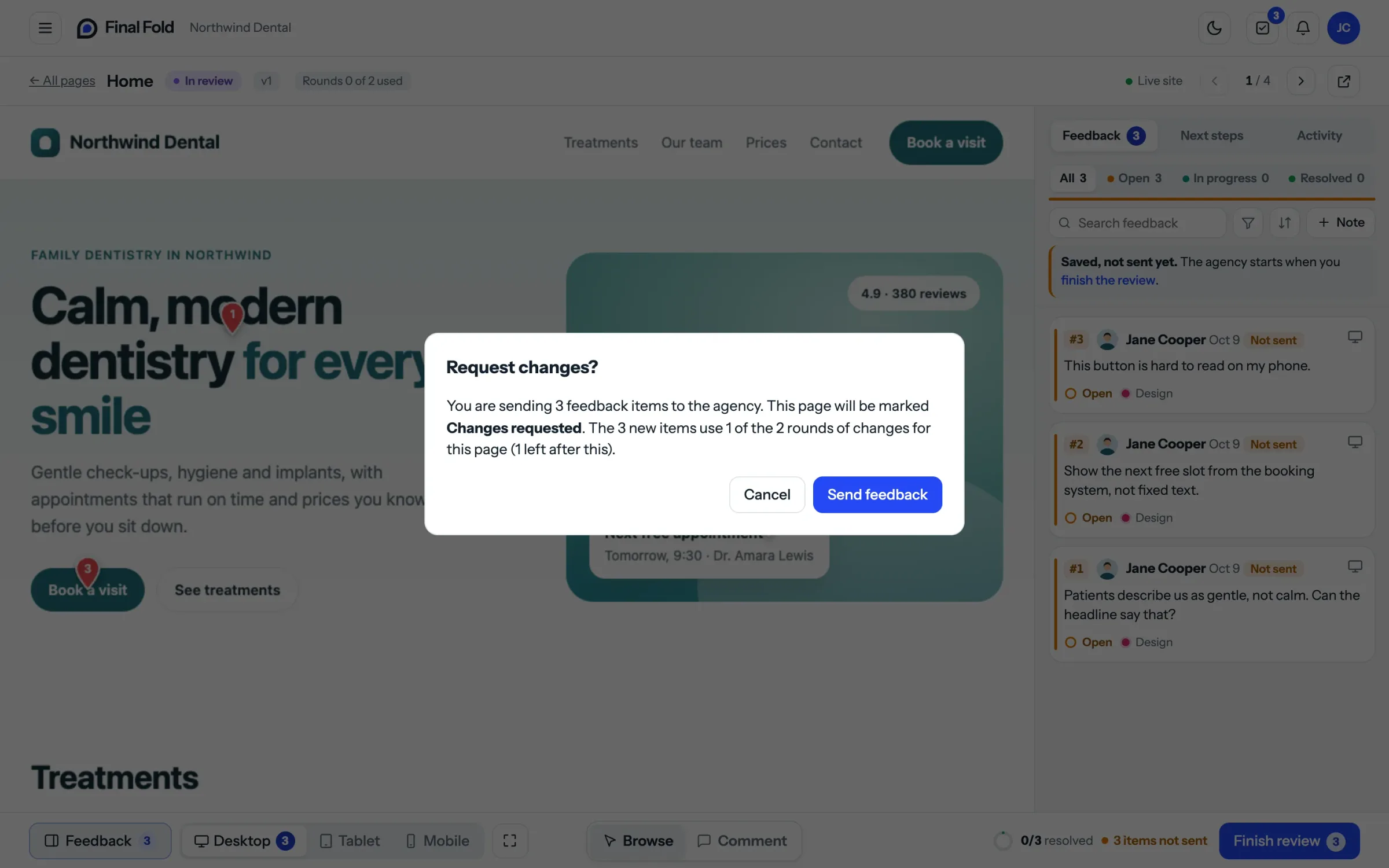
Rounds fail when they live only in the contract. The client signed it weeks ago and doesn't remember the number. Then the third round arrives, you mention the limit, and it feels like a surprise rule. The fix is to make the count part of the review itself:
- Before the client sends a batch, they see that this is round 2 of 2 for the page.
- When a round is the last one, they're told, so they can gather everything carefully.
- After rounds are used, further requests are clearly marked as extra, with your price, and wait for your answer.
This is where the process and the tool meet. Whatever you use to collect feedback, it should know what a round is. If feedback arrives through email, chat and calls, nobody can count anything, and the limit becomes a matter of memory.
If both sides can see the count, nobody has to argue about it.
A checklist for revision rounds
Use this before you send your next proposal and again at kickoff:
- The proposal states how many rounds each page includes, at each stage
- One round is defined as one batch of feedback on a page, sent together
- It says that fixing your own mistakes never uses a round
- It says what happens when rounds run out, with a typical price for extras
- It separates changes from new scope, and says new scope is priced separately
- It includes a reopening allowance for changes after approval
- The client knows who on their side gathers feedback and sends each round
- Feedback is collected in one place, where rounds can be counted
- The client can see how many rounds a page has left before sending feedback
- Extra requests are agreed before the work starts, never on the invoice
FAQ
What is a revision round in web design?
A revision round is one complete set of feedback on a design or page, sent together, followed by the designer's changes. The round ends when the updated version is sent back for review.
How many revisions should a web designer offer?
Two rounds of changes per page at the design stage and one on the built page is a common and fair starting point. Simple template projects can work with fewer; complex custom designs sometimes need a third round at the design stage.
Is two rounds of revisions enough?
Usually, yes, if the brief is clear and each round gathers all the feedback at once. If projects regularly need more, the problem is often an unclear brief or feedback arriving in pieces, not the number of rounds.
Should revision rounds be per page or per project?
Per page. A project-wide allowance lets one busy page, usually the homepage, use up the rounds the other pages need. Per-page rounds are fairer and make it easy to see where a project is stuck.
Do small text changes count as a revision?
They count as part of a round, not as a round on their own. A typo fix or a small wording change belongs in the next batch of feedback. If you made the typo, fixing it never uses a round.
What is the difference between a revision and new scope?
A revision changes something that was in the agreed project. New scope adds something that wasn't: a new page, feature or piece of content. Revisions use rounds; new scope is quoted separately.
Should I offer unlimited revisions to win clients?
It's rarely worth it. Unlimited revisions remove the reason to give complete, decisive feedback, which makes projects longer for both sides. A clear number of rounds, plus a fair price for extras, gives clients the same reassurance with an end in sight.
Where to start
Pick one project you're quoting this month and add three things to the proposal: the number of rounds per page, a one-sentence definition of a round, and what happens when they run out. Then, at kickoff, show the client how they'll send each round and where they'll see how many are left.
You'll notice the difference in the first batch of feedback. When a round means something, clients take the time to gather their thoughts, and your projects start to end when they're supposed to.
How Final Fold handles revision rounds
Final Fold counts rounds of changes per page, using the definition in this guide: one "Request changes" is one round, however many notes it carries. The client sees how many rounds a page has left before sending, and items sent back because they weren't fixed never use a round. When a page's rounds are used, new notes arrive as extra requests for you to accept or decline, and work outside the original request can be marked as new scope. Reopenings after approval have their own allowance, and the client gives a reason each time.
14 min left0%