Scope creep in website projects: how to spot it and handle it without losing the client
Scope creep rarely arrives as one big demand. It comes one small request at a time. Here is how to spot it early, talk about it kindly and price it fairly.
Final Fold
13 min read

It starts with a message that sounds like nothing: "While you're in there, could you add a little section about our new service? Just a paragraph."
Of course you say yes. It's a paragraph. Then the paragraph needs a heading, and an icon, and the client mentions they'd love a short form under it so people can enquire. A week later someone suggests the section would work better as its own page. The page needs a new layout. The new layout would look great on the homepage too.
None of these requests were unreasonable. Each one was small, friendly and asked in good faith. But together, they've added a page, a form and a new homepage section to a project that was priced without any of them. That's scope creep: not one big demand, but many small ones that nobody stopped to count.
This guide covers what scope creep looks like on a website project, why it happens, how to prevent most of it, and what to say when it arrives, so you can protect your time without making the client feel like they've done something wrong.
The short answer
Scope creep in a website project is unplanned work added to the agreed scope, usually in small requests. You handle it by making the scope specific, separating changes from new work during review, and pricing additions openly and quickly.
- Write the scope in pages and features, not in phrases like "a modern website".
- Define rounds of changes, so normal revisions have a clear shape.
- Collect feedback in one place, where each request can be seen and judged.
- Tell changes from new scope: a change adjusts something agreed; new scope adds something that wasn't.
- Answer new scope with options, not refusals: as an extra, in a later phase, or not in this project.
- Price small additions quickly, with simple fixed prices clients can say yes to.
What does scope creep look like on a website project?
Scope creep on a website usually looks friendly and small. It hides in phrases like "just", "quickly" and "while you're at it". Here are the shapes it takes most often.
- The small addition. "Can we add a section about…", "Could there be a testimonial slider here?" Each addition is modest; together they reshape the project.
- The new page. "We've realised we need a careers page." Pages bring their own design, content and review rounds.
- The feature someone saw elsewhere. "Our competitor has a chat bubble, can we have one?" Features often bring integrations, accounts and testing you didn't plan for.
- The content that isn't ready. Missing copy and images lead to placeholders, then rewrites, then layout changes to fit the new content.
- The new decision-maker. A senior person sees the site late and wants their own changes, effectively restarting decisions already made.
- The never-ending last round. Feedback that keeps coming after the agreed rounds, each batch introducing new ideas instead of refining agreed ones.
Notice that none of these require a difficult client. Most scope creep comes from enthusiastic clients who are learning what they want as they see the website take shape. That's natural. The problem is only when nobody notices it's happening.
Scope creep is rarely one big request. It's many small ones that nobody counted.
Why does scope creep happen?
Scope creep happens when the edges of a project aren't visible to both sides. Three causes account for most of it.
The scope was never specific. A proposal that promises "a modern, responsive website that reflects your brand" has no edges. Every request can be argued to fit inside it. If the scope doesn't list pages and features, nobody can say what's outside it.
Revisions have no shape. When the number of rounds isn't defined, there's no natural point to notice that the feedback has moved from refining the agreed design to adding new things. Everything blends into one long revision.
Feedback arrives in too many channels. An email here, a message there, a request mentioned on a call. When requests are scattered, nobody sees them together, so nobody notices that five "small" requests add up to a new page.
Fix these three and most scope creep becomes visible early, while it's still easy to talk about.
When the edges are clear, creep is easy to see. When they're vague, it's invisible until it hurts.
How do you prevent scope creep before it starts?
Prevent scope creep with a scope that lists pages and features, a clear definition of revision rounds, and one approval owner on the client's side. Most of the work happens in the proposal and the kickoff.
Write the scope in pages and features
List what's included in concrete terms: the pages by name, the features by name, who provides the content, and what the main integrations are. For example:
- Pages: Home, About, Services (overview plus three service pages), Contact. Eight pages in total.
- Features: contact form sent to one email address, newsletter sign-up connected to the client's existing email tool, image gallery on the About page.
- Content: the client provides all text and photos by the start of the design stage.
- Not included: online booking, a blog, translations, ongoing content updates.
That last line matters. A short "not included" list answers the most likely requests before they're asked, and it makes later conversations easier: you can point to the list instead of saying no.
Define rounds of changes
Agree how many rounds of changes each page includes, and what one round is: one batch of feedback on a page, sent together. When rounds are defined, it's easy to see when feedback stops being a revision and becomes something new.
Name one approval owner
One person on the client's side approves pages and decides. Others can review. This prevents the late decision-maker problem, because their views go through the approval owner instead of arriving as a second set of changes.
A specific scope, defined rounds and one decision-maker prevent most scope creep before it starts.
How do you tell a change from new scope?
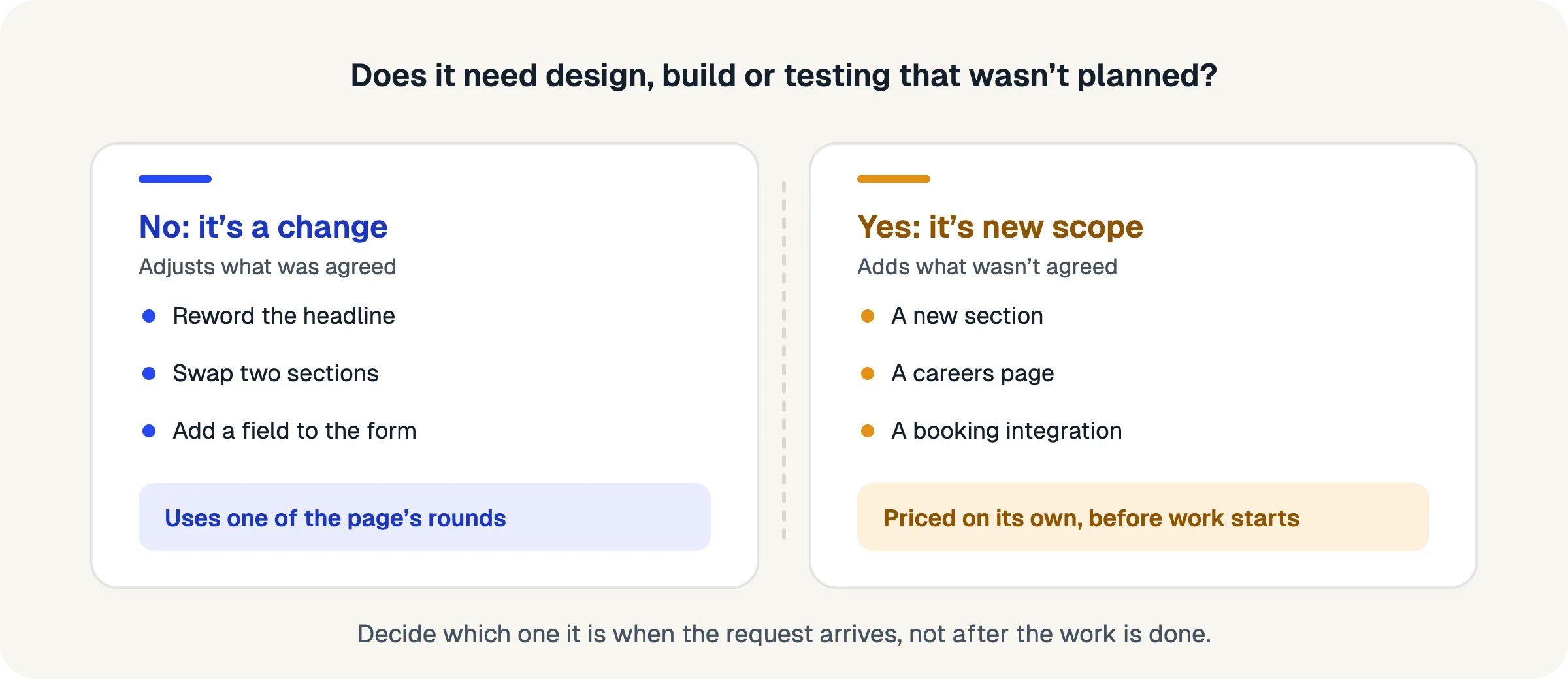
A change adjusts something that was agreed; new scope adds something that wasn't. If the request makes an existing page, section or feature closer to what was agreed, it's a change. If it adds a page, section, feature or integration, it's new scope.
Here are some examples from real website reviews:
- "Make the headline say 'gentle', not 'calm'." A change.
- "Swap these two sections around." A change.
- "The form should also ask for a phone number." A small change.
- "Add a section about our new service." New scope.
- "We need a careers page." New scope.
- "Can the form send to our booking system?" New scope: it's an integration.
- "Use a different layout for the whole homepage." A change if it's within the rounds; a redesign if the layout was already approved.
Some requests sit in between. A small new paragraph in an existing section is often fine to absorb; a new section with its own design isn't. When in doubt, ask yourself: does this need design, build or testing work that wasn't planned? If yes, it's new scope.
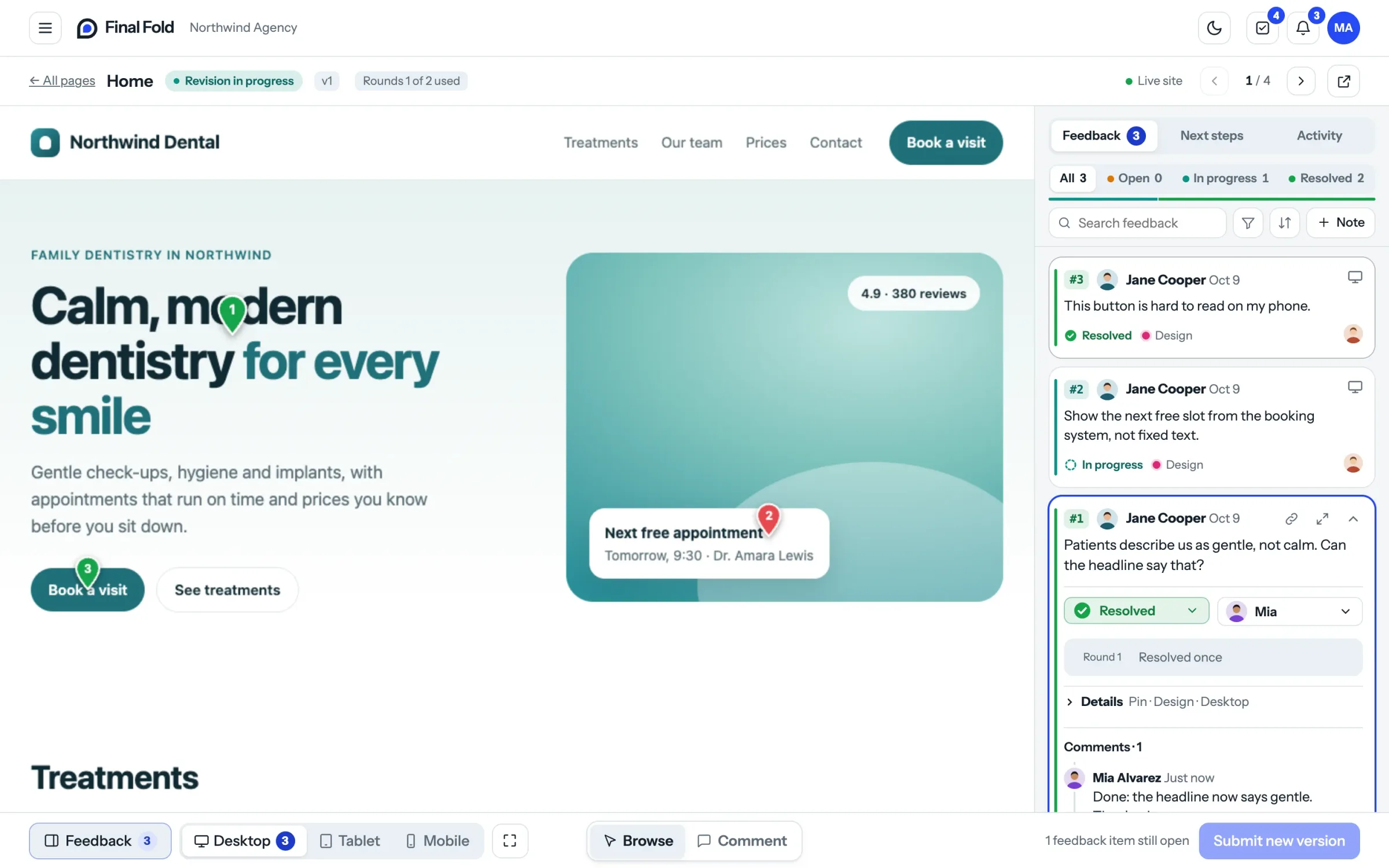
The best moment to make this call is when the request arrives, not when you've already done the work. If feedback is collected in one place, with each note pinned to the part of the page it's about, you can judge each one in seconds and mark the new-scope items before anyone starts on them.
Changes refine what was agreed. New scope adds to it. Decide which one it is before the work starts.
What do you say when a client asks for something out of scope?
Respond quickly, warmly and with options. Never just say no, and never quietly say yes. Here are scripts for the three most useful answers.
"Yes, as an extra"
Use this when the request is reasonable and you have time to do it now.
"That's a good idea. It wasn't part of the original plan, so it would be an addition at [price]. If you'd like it, I'll add it into this round and the launch date stays the same."
"Yes, in a later phase"
Use this when the request is good but would delay the launch, or when the client is still deciding.
"Love it. To keep the launch on track, how about we put it in a second phase straight after launch? I'll send a short quote so you can plan for it."
Phase two is one of the most useful tools you have. It lets you say yes to the idea without letting it delay the project, and it often turns into the next piece of paid work.
"Not in this project"
Use this when the request doesn't fit the project at all, or isn't a good idea for the client.
"I'd hold off on that one. It would need [what it needs], and I don't think it would pay off for your visitors right now. If it becomes important later, we can look at it properly."
All three answers do the same three things: they acknowledge the idea, make the scope visible without blaming anyone, and give the client a clear choice. That's what keeps the relationship intact.
Answer new scope with a choice, not a verdict.
How should you price out-of-scope requests?
Price small additions with simple fixed prices and larger ones with a short quote. The goal is speed: a client should be able to say yes in one reply.
For small requests, a short internal price list saves a lot of back-and-forth:
- A small change across one page (a new paragraph, an extra field on a form): one small fixed price.
- A new section on an existing page: a larger fixed price, including its design and one round of changes.
- A new page using an existing layout: a set price per page.
- A new page with a new layout, a feature or an integration: a short written quote.
Fixed prices work because they remove the uncertainty that makes clients hesitate. "That would be [price]" is easier to agree to than "I'll track the hours". Hourly billing still makes sense for open-ended work, but for the small requests that make up most scope creep, a fixed price is faster for both sides.
One more principle: price before you start, always. Work done first and priced afterwards turns a friendly addition into an awkward invoice.
A price the client can see before saying yes is a price they'll usually accept.
How do you keep the relationship while holding the line?
Be consistent, be early and be generous with small things. Clients respect a clear line far more than a vague one, as long as it's applied kindly.
- Mention scope early. The first time a small addition appears, name it lightly, even if you decide to include it: "This one's outside the plan, but it's small, so I'll include it." It sets the pattern without a confrontation.
- Be generous on purpose. Absorbing the odd tiny request builds goodwill, as long as you say you're doing it. Unannounced generosity is invisible; announced generosity is a gift.
- Keep the conversation about the project, not the client. "This would delay the launch" is better than "you keep adding things".
- Make the plan the bad guy. Pointing to the proposal ("we agreed on eight pages") keeps the conversation friendly.
Most clients don't want to take advantage. They simply don't know where the edges are. When you show them, kindly and consistently, they usually appreciate it.
Clear edges are a service to the client, not a defence against them.
What if scope creep has already happened?
Sometimes you notice too late. The project is halfway through, the additions have piled up, and the original price no longer matches the work. You can still recover, as long as you talk about it soon and calmly.
- List what's been added. Go through the feedback and messages and write down every addition that wasn't in the original scope: the new section, the extra page, the form that now connects to another tool. Seeing them together usually makes the conversation easier, for you and the client.
- Separate what's done from what's still to come. Work you've already delivered is harder to charge for after the fact. Work still ahead is where you have room to adjust.
- Decide what you'll absorb. You may choose to include the work already done, as a gesture, and make that clear. It shows good faith and resets the pattern.
- Talk to the client before doing more. Keep it factual and forward-looking: "Looking at where we are, we've added a few things since the start: [list]. I've included those so far. For the remaining items, here are the options and prices, so we can keep the launch on track."
- Agree the rest of the project. Update the scope, the price or the timeline in writing, even if it's a short email, so both sides are working from the same plan again.
The conversation is rarely as difficult as it feels beforehand. Most clients haven't noticed how much has been added, and they appreciate being told clearly rather than discovering it on an invoice.
Learn from it for the next project
Once the project is back on track, look at where the creep came from. Was the scope too vague? Were rounds undefined? Did requests arrive in too many places? Each answer points to one change in your proposal or process, and that change is worth more than the extra fee.
It's never too late to make the scope visible again. It only gets harder the longer you wait.
A checklist for preventing and handling scope creep
- The proposal lists pages, features, content responsibilities and main integrations by name
- It includes a short "not included" list
- Rounds of changes are defined per page, with what happens when they run out
- One approval owner is named on the client's side
- All feedback is collected in one place, pinned to what it's about
- Each request is judged as a change or new scope before work starts
- New scope gets one of three answers: an extra, a later phase, or not in this project
- Small additions have simple fixed prices; larger ones get a short quote
- Every addition is priced and agreed before the work starts
- Small things you include for free are mentioned, so the goodwill is visible
FAQ
What is scope creep in web design?
Scope creep is unplanned work added to a website project after the scope was agreed, usually through a series of small requests such as extra sections, pages or features, without a matching change to the price or timeline.
How do you handle scope creep with clients?
Name it early and kindly, separate changes from new scope, and offer options: add it as a priced extra, move it to a later phase, or leave it out of this project. Agree the price before starting any added work.
What is the difference between a change and new scope?
A change adjusts something that was in the agreed project, such as wording, layout or colours. New scope adds something that wasn't, such as a new page, section, feature or integration.
Should I charge for small changes?
Small changes within the agreed rounds are part of the project. Small additions that weren't in the scope can be charged with a simple fixed price, or included for free if you choose, as long as you say so.
How do I write a website scope that prevents scope creep?
List the pages by name, the features by name, who provides the content and when, the main integrations, and a short list of what's not included. Add the number of rounds of changes per page.
Is scope creep always bad?
No. Scope creep often reveals what the client really needs, and handled well, it becomes extra paid work or a second phase. It's only a problem when it happens without anyone noticing or pricing it.
Where to start
Open your current proposal template and add two things: a list of pages and features by name, and a short "not included" section. Then, in your next review, read each request with one question in mind: is this a change or new scope? Decide before anyone starts work.
Scope creep doesn't disappear entirely, and it shouldn't. Clients learn what they want as they see their website. The goal is simply that every addition is seen, discussed and priced, so the project you deliver is the one both sides agreed to.
How Final Fold handles scope
In Final Fold, each client note is pinned to the element it's about on the live page, so you can judge it in context. Rounds of changes are counted per page and visible to both sides. When a page's rounds are used, new notes arrive as extra requests for you to accept or decline, and work outside the original request can be marked as new scope, so additions are never mixed in with revisions.
13 min left0%