The website launch and handover checklist for agencies
The end of a project is where client trust is won or lost. Here is a complete checklist for launch and handover, from final approval to the first month of aftercare.
Final Fold
13 min read

The site is live. The client has sent a thank-you message with three exclamation marks. Your team is already looking at the next project.
Then, on Monday morning, an email: "The contact form isn't sending anything. Also, how do I change the opening hours? And who has the login for the domain?" By Wednesday there are three more questions, a request for a change that may or may not be included, and a slightly worried tone in the client's messages. A project that ended on a high is drifting into confusion.
The last week of a website project is the part clients remember most. A launch that goes smoothly, followed by a handover that answers their questions before they ask, makes them feel looked after. It's also the moment they decide whether to recommend you. This guide is a complete, practical checklist for that last stretch: before launch, launch day, the handover, the project record, closing the project and the first month of aftercare.
The short answer
A good website launch and handover moves through six stages: confirm the approval, prepare and test before launch, launch with a short checklist, hand over access and guidance, keep a record of what was approved, then close the project and agree how aftercare works.
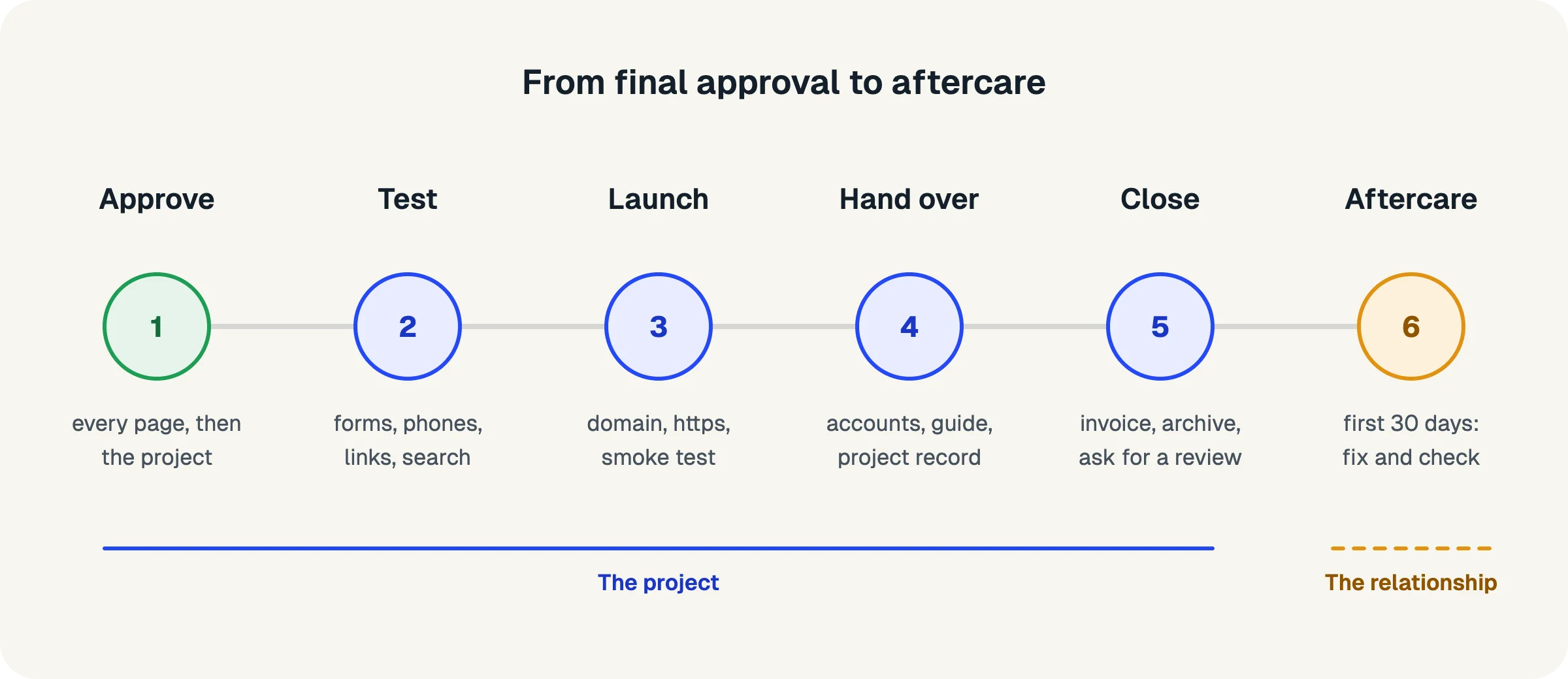
- Launch only after final approval, and make sure every page has been signed off.
- Test the things clients notice: forms, mobile layouts, links, speed and email.
- On launch day, check the basics (domain, security certificate, search settings) and tell the client.
- Hand over a short pack: logins and ownership, a guide to editing content, and what support includes.
- Keep the project record: what was approved, when, and what changed.
- Close properly: final invoice, archive the project with its outcome, and ask for a review.
What should you check before launching a website?
Before launch, confirm the approval, then test everything a visitor or the client will touch: content, forms, mobile layouts, links, performance, analytics and backups.
Approval and content
- Every page has been approved, and the final project approval is signed
- All placeholder text and images have been replaced with final content
- Spelling and grammar have been checked on every page
- Legal pages (privacy, terms, cookie notice) are in place and reviewed by the client
- Contact details, opening hours and prices match what the client gave you
Forms and functionality
- Every form sends to the right address, and the client has received a test submission
- Confirmation messages and emails appear after each form is sent
- Spam protection is working without blocking real submissions
- Integrations (newsletter tool, booking system, payments) are connected to the client's live accounts, not test accounts
Mobile, browsers and accessibility
- Every page has been checked on a phone, a tablet and a desktop screen
- The site works in the main browsers your client's visitors use
- Text is readable, buttons are large enough to tap, and colours have enough contrast
- Images have alternative text, and the site can be used with a keyboard
Links, speed and search
- There are no broken links, and every link goes where it should
- Redirects are set up from the old site's addresses to the new pages
- Images are compressed, and pages load quickly on a phone connection
- Each page has a title and description for search results
- The site is set to be visible to search engines (staging sites are often hidden)
Analytics and backups
- Analytics are installed and connected to the client's own account
- Backups are set up and tested, with a copy of the site before launch
- Error monitoring or uptime checks are in place if they're part of your service
The things clients notice first are forms, phones and broken links. Test those twice.
What happens on launch day?
On launch day, point the domain to the new site, check the security certificate and search settings, run a quick smoke test of the live site, and tell the client it's live with a short summary.
Launch day should be uneventful. If the testing above is done, the day is mostly about switching over and checking.
- Choose a quiet time to launch, and tell the client when it will happen
- Point the domain to the new site and confirm the change has taken effect
- Check that the security certificate is active (the site loads with https and no warnings)
- Confirm the live site is visible to search engines and the sitemap is available
- Run a smoke test on the live site: home page, main pages, every form, on a phone and a desktop
- Send a test form submission from the live site and confirm it arrives
- Check that analytics are recording visits on the live site
- Tell the client the site is live, with a short list of what was checked
The message to the client matters more than it seems. "Your new website is live. We've checked the forms, mobile layouts and search settings on the live site, and everything is working. Your handover pack is attached." It turns a technical event into a reassuring moment.
A launch should be the calmest day of the project.
What should a website handover pack include?
A website handover pack should give the client everything they need to own and run their site: access and ownership details, a short guide to editing content, what support includes, and the project record.
Keep it short and practical. A few clear pages are more useful than a long manual nobody reads.
Access and ownership
- A list of every account: domain, hosting, the website's admin, analytics, email tools and integrations
- Who owns each account (ideally the client, not your agency)
- How to log in, and how passwords are shared securely (never in a plain email)
- Renewal dates for the domain, hosting and any paid tools
A guide to editing the site
- How to change text and images on a page
- How to add a new item where it's expected (a blog post, a team member, a service)
- What not to change without help (layouts, settings, code)
- A short video walkthrough, if you offer one
Support and aftercare
- What's included after launch, and for how long (for example, fixing bugs for 30 days)
- How to request changes, and how they're priced
- How quickly you respond, and how to reach you
The project record
- The final approval document, with the date and the approver's name
- A summary of what was built: pages, features and integrations
- Any decisions worth remembering (for example, why a feature was left for a later phase)
A handover pack answers the questions the client hasn't asked yet.
Why does the project record matter at handover?
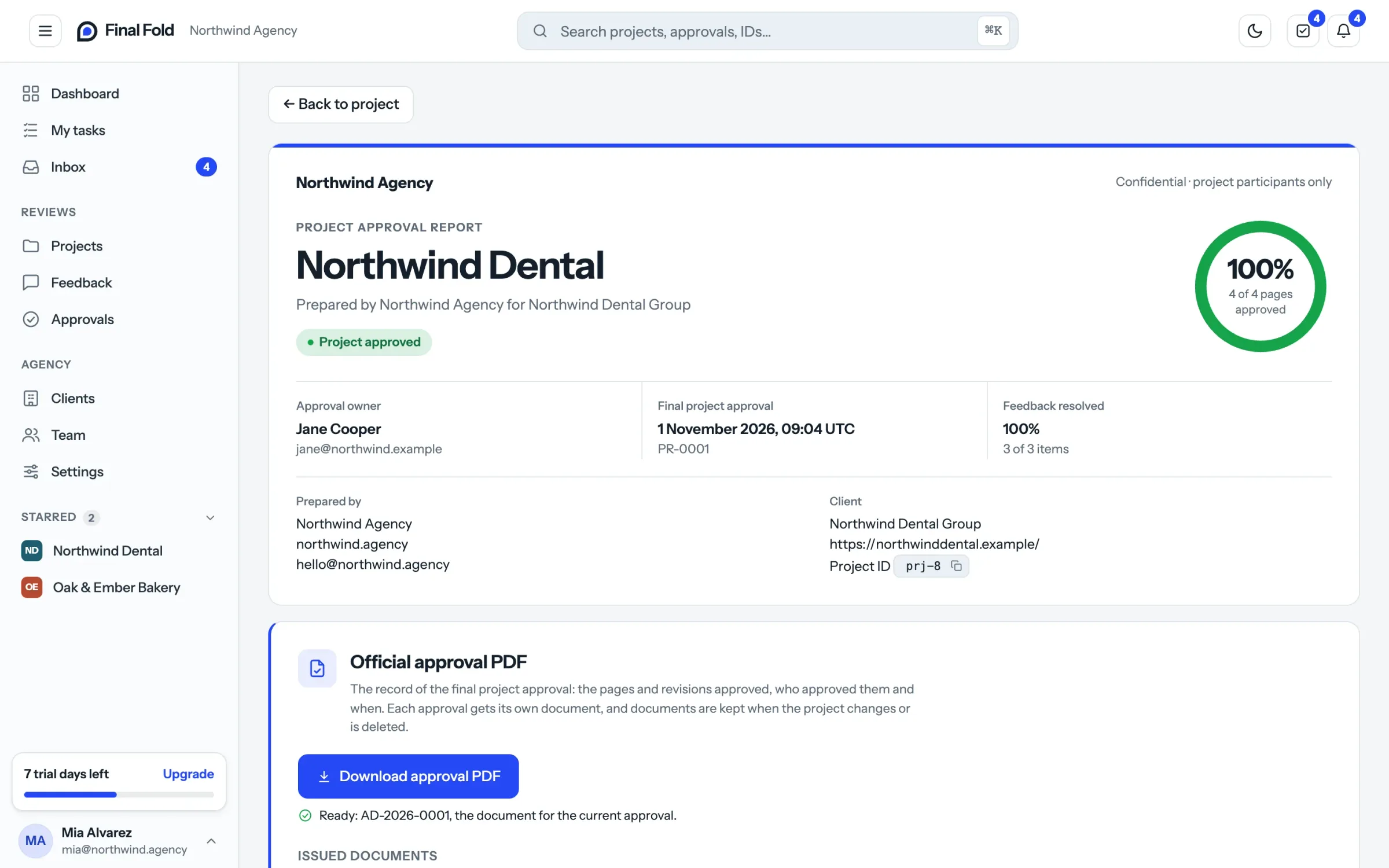
The project record shows what was approved, by whom and when, and what changed along the way. It protects both sides after launch, when memories fade and new people join the client's team.
Months after launch, questions come up: Why does the homepage look like this? Who decided to leave out the booking system? Was this page approved before or after the new branding? Without a record, the answers depend on someone's memory or a search through old emails.
A good project record includes:
- Every page approval, with the approver's name and the date.
- The final project approval, signed and dated, ideally as a fixed document.
- Reopenings, with the reason each page was reopened and the new approval.
- Decisions about scope: what was moved to a later phase or left out, and why.
Hand this record to the client as part of the handover pack, and keep your own copy. It's the most reliable answer to "what did we agree?", for years to come.
Memory fades. A record doesn't.
How do you close a website project properly?
Close a website project with the final invoice, an archive of the project that records its outcome, a short thank-you, and a request for a review or referral.
Closing is easy to skip, because the next project is already waiting. But a clean close makes the end of the relationship as professional as the start.
- Send the final invoice, tied to the final approval as agreed in the proposal
- Archive the project, recording its outcome (completed, or closed for another reason)
- Export or save the project's files and records where you keep finished work
- Remove your agency's access to accounts you no longer need
- Send a short thank-you message, with the handover pack attached again
- Ask for a review or testimonial, while the launch is still fresh
- Ask whether anyone else they know might need a website
The review request works best a week or two after launch, when the client has seen the site working. Make it easy: a direct link and a one-line request. Happy clients are usually glad to help; they just need to be asked.
What if the project didn't end with a launch?
Some projects end differently: the client goes quiet, the budget is cut, or priorities change. Close these too, honestly. Record the outcome (for example, closed because the client stopped responding), note which pages were approved and which weren't, and send a polite message explaining what happens next. A clear record protects you if the project restarts or the final invoice is questioned.
Finish the project as carefully as you started it.
What does good aftercare look like in the first 30 days?
Good aftercare means a short, defined period where you fix anything that isn't working, check the site's health, and help the client settle into running it, followed by a clear way to request and price future changes.
The first month after launch is when small issues appear: a form that sends to an old address, a page that looks odd on a particular phone, a question about editing content. Handling these quickly builds the trust that leads to future work.
- Fix bugs and launch issues at no cost during an agreed period (30 days is common)
- Check analytics after the first week and share anything useful with the client
- Check forms, backups and uptime regularly during the first month
- Answer editing questions, and update the guide if the same question comes up twice
- At the end of the period, explain how future changes work: a care plan, a small fixed price per change, or a quote for larger work
Be clear about what counts as a bug and what counts as a change. A form that doesn't send is a bug; a new section on the homepage is a change. Agreeing this in the proposal makes aftercare conversations simple.
Aftercare turns a finished project into a long relationship.
Common launch and handover mistakes
Even experienced teams trip over the same few things at the end of a project. Most of them come from rushing, because the end of a project feels like the easy part.
Launching before the final approval. A launch date set months ago can feel more important than the approval. But launching a site the client hasn't signed off turns every later request into an argument about whether the project was finished. Get the approval, then launch.
Keeping accounts in the agency's name. Registering the domain or hosting under your own account is convenient during the build. Left that way, it creates a dependency neither side wants, and an awkward conversation if the relationship ends. Move ownership to the client as part of the handover.
Forgetting the staging settings. Staging sites are often hidden from search engines, and that setting sometimes travels to the live site. A week later, the client asks why they can't find their new website on search. Make it a launch-day check.
Sending passwords by email. Logins in a plain email stay in inboxes for years. Use a password manager's sharing feature or another secure method, and ask the client to change passwords once they've logged in.
A handover pack nobody can use. A long technical document is impressive and rarely opened. Clients need a short guide to the few things they'll actually do: edit a page, add an item, ask for help.
Leaving aftercare undefined. If the proposal doesn't say what's included after launch, every request becomes a negotiation. Define a period, what counts as a bug, and how changes are priced, before the project starts.
Skipping the close. Without a final invoice, an archived project and a thank-you, the project just fades out. A clear close makes it easier to start the next project with the same client.
Most handover problems are small decisions put off until after launch. Make them before.
The complete website launch and handover checklist
Here is the full list in one place, to copy into your project template.
Before launch
- Every page approved; final project approval signed
- Final content in place; legal pages reviewed
- Forms, confirmations and integrations tested on live accounts
- Mobile, browser and accessibility checks done
- Links checked; redirects from the old site set up
- Speed, page titles and descriptions checked; site visible to search engines
- Analytics on the client's account; backups set up and tested
Launch day
- Domain pointed to the new site; security certificate active
- Smoke test of the live site on phone and desktop; test form submission received
- Analytics recording live visits
- Client told the site is live, with a summary of checks
Handover
- Account list with owners, logins shared securely, renewal dates
- Guide to editing content
- What support includes and how to request changes
- Project record: approvals, reopenings and scope decisions
Closing
- Final invoice sent
- Project archived with its outcome; files and records saved
- Agency access removed where no longer needed
- Thank-you sent; review and referral requested
Aftercare (first 30 days)
- Launch bugs fixed; forms, backups and uptime checked
- First-week analytics shared
- Future changes explained: care plan, fixed prices or quotes
FAQ
What is a website handover?
A website handover is the step where an agency gives the client everything they need to own and run their new website: access to accounts, guidance for editing content, details of support, and a record of what was approved and built.
What should be included in a website handover document?
A list of accounts with owners and renewal dates, how to log in, a short guide to editing content, what support includes and how to request changes, and the project record, including the final approval.
Who should own the domain and hosting?
Ideally the client, in accounts in their own name, with your agency given access as needed. This avoids problems if the relationship ends and makes the client the clear owner of their website.
How long should website aftercare last?
A period of around 30 days for fixing launch issues at no cost is common. After that, changes are usually handled through a care plan, a fixed price per change, or quotes for larger work.
When should you send the final invoice for a website?
When the final approval is given, if that's what your proposal says. Tying the final payment to the client's sign-off gives both sides a clear, visible moment rather than a vague idea of completion.
What's the difference between a bug and a change after launch?
A bug is something that doesn't work as agreed, such as a form that doesn't send. A change is something new or different, such as a new section or different wording. Bugs are usually fixed during aftercare; changes are priced.
Where to start
Copy the complete checklist above into your project template and use it on your next launch. Then build a handover pack template once, with sections for accounts, editing, support and the project record, so each new handover is a matter of filling it in.
The effort is small, and the effect is noticeable. Clients who launch smoothly and receive a clear handover feel looked after, ask fewer worried questions, and are far more likely to recommend you.
How Final Fold helps at handover
Final Fold keeps the project record as the work happens: every page approval with the approver's name and date, the signed final approval with its official PDF, and the reason for any reopening. The approval report shows the whole history, ready for the handover pack. Projects can be exported (CSV, Excel, JSON or a report), and archived with a recorded outcome, so a finished project and one that was closed early never look the same.
13 min left0%